The Essential Toolkit for Building AI Agents in 2026
What I learned building agents for the past two years. A practical guide to the frameworks, tools and patterns that actually work.
Listen to this article
Play the audio version while you read or on the go.
What I learned building agents for the past two years
Two years ago, a friend introduced me to LangChain. I was immediately hooked; here was a framework that let LLMs do things they couldn't do on their own. Live web search. Calling external tools. Querying databases. Back then, LLMs were just text completion engines. LangChain opened up a whole new world of possibilities.
I dove in deep. Took a comprehensive course, spent weeks in the documentation and most importantly, kept building. From simple document Q&A bots to complex research agents navigating knowledge graphs.
Here's what I've learned works, what doesn't and what you actually need to know.
The foundation: Frameworks
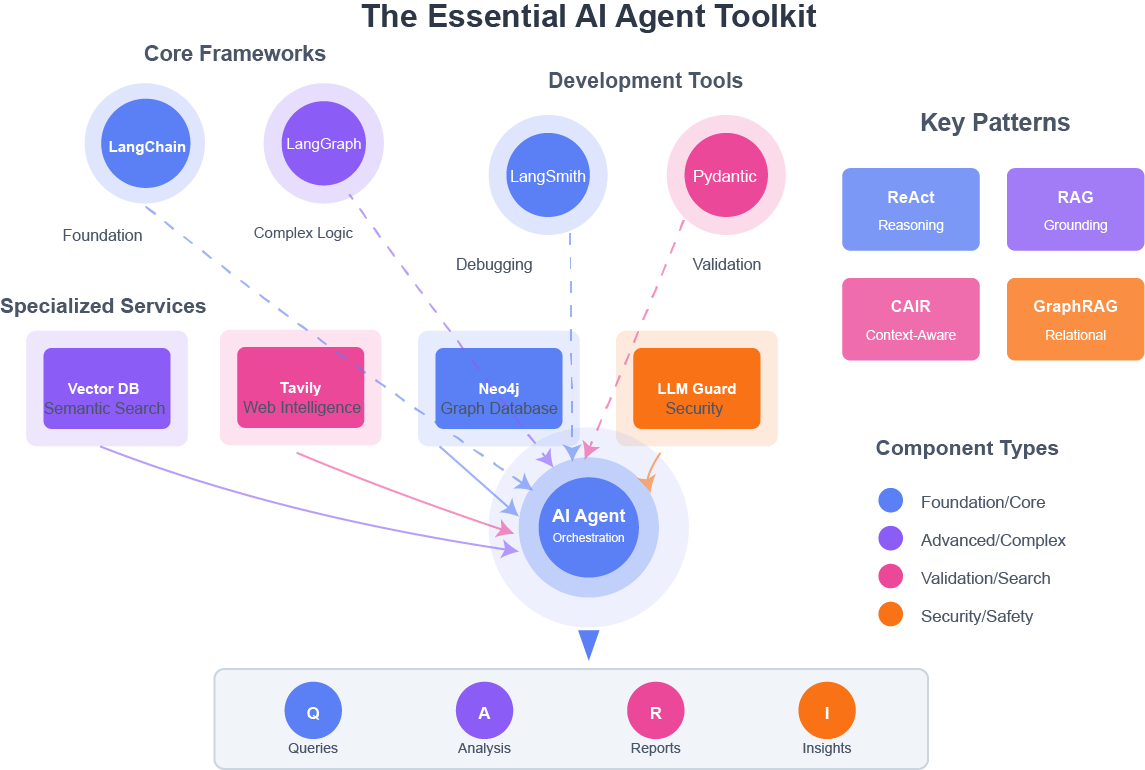
LangChain: Where I started (and where you should too)
The course I took walked through building agents at every level of sophistication. But the real learning came from building projects where I needed agents to orchestrate database queries, web searches and data validation in complex workflows.
Here's what I learned: LangChain is the React of AI development-opinionated, occasionally frustrating, but ultimately the right choice because the ecosystem has converged around it.
What it actually does:
- Connects LLMs (Claude, GPT, etc.) to your data sources
- Manages conversation history so your AI doesn't have amnesia
- Provides pre-built integrations for common tools
- Gives LLMs the ability to call external APIs, search engines, databases
- Handles the plumbing you don't want to write yourself
LangGraph: When LangChain stops being enough
After building several agents with LangChain, I hit cases where I needed:
- Conditional decisions based on intermediate results
- Loops that verify and retry
- Complex multi-step reasoning with branching paths
That's when LangGraph became essential.
The difference: LangChain follows a linear path. LangGraph handles conditional branches and complex decision trees.
When you need it: When your agent's logic becomes a flowchart with conditional branches. When you find yourself hacking around LangChain's linear structure.
When you don't: For your first few agents. Build simpler things first, understand the patterns, then graduate to LangGraph.
Development tools I rely on
LangSmith: The debugger that saves hours
Debugging AI agents without LangSmith is like debugging web apps without browser DevTools. You're flying blind.
What you actually see:
- Which documents your RAG retrieved (and why it picked certain ones)
- The exact prompt sent to the LLM (often different from what you expected)
- Cost per request (important when you're making hundreds of calls)
- Latency breakdown (where time is actually spent)
- Failure points (without this, debugging takes forever)
When to use it: Day one. Don't wait until you have problems. The traces help you understand what's working too.
Pydantic: Catch errors before production
LLMs return text. Sometimes that text is malformed JSON. Sometimes it's the wrong data type. Sometimes it's just garbage.
Pydantic catches this immediately:
class ResearchPaper(BaseModel):

    title: str

    authors: list[str]  # Enforces this is a list

    year: int

# This explodes if the LLM returns bad data

paper = ResearchPaper.model_validate_json(llm_response)
When you need it: Before any structured data hits your system. In production, this is non-negotiable.
Specialized tools that unlock capabilities
Vector Databases: Semantic search that actually works
Traditional databases search for exact keyword matches. Vector databases search for meaning.
Search "heart attack" → finds documents about "myocardial infarction"
Search "cheap flights" → finds "budget airlines" and "discount travel"
# Store documents

vectorstore.add_documents(chunks)

# Search by meaning

results = vectorstore.similarity_search(

    "cheap flights",

    k=5

)
Popular options:
- Pinecone: Easiest to start, generous free tier
- Weaviate: Open source, more control
- Chroma: Runs locally, perfect for prototyping
When you need it: Any RAG application where semantic search matters more than exact keyword matching.
Tavily: Web search built for AI agents
Your agent needs current information. Stock prices, news, API docs that changed yesterday, research papers published last week.
What makes it different: Traditional search APIs return raw HTML. Tavily returns content already cleaned and formatted for LLMs-no ads, no navigation, just the content your agent needs.
from tavily import TavilyClient

tavily = TavilyClient(api_key="your-key")

response = tavily.search(

    "latest AI research January 2026",

    search_depth="advanced",

    time_range="month",

    include_answer=True

)
When you need it: Research agents, fact-checking, monitoring, anything requiring current information beyond your training data.
Neo4j: When relationships matter
For some problems, data isn't just documents-it's entities and relationships. That's where graph databases shine.
When you need it: When your data is naturally relational and you need to traverse connections. Not for simple document search; use vector databases for that.
LLM Guard: Security before launch
Production AI without security is asking for trouble.
What you're protecting against:
- Prompt injection ("ignore previous instructions...")
- Data leaks (API keys, customer data)
- Jailbreaks (bypassing safety rails)
- PII exposure
from llm_guard import scan_prompt, scan_output

# Before sending to LLM

sanitized_prompt, is_valid = scan_prompt(user_input)

if not is_valid:

    return "I can't process that request."

# After receiving from LLM

sanitized_output, is_safe = scan_output(llm_response)
When you need it: Before anything customer-facing goes live. Not optional.
A real example: Building a biomedical research platform
Let me show you what these tools look like working together. I built a platform for biomedical research that helps navigate complex relationships in scientific data-the kind of problem where entities (genes, diseases, drugs, variants) are all interconnected.
The technical challenge:
Users needed to ask complex questions that required traversing multiple relationships: "If variant X affects gene Y and gene Y is in pathway Z, what drugs target that pathway?"
This isn't a simple document search. It's multi-hop reasoning across connected data.
The architecture:
Neo4j as the backbone:
Stored relationships between biological entities:
Variant -[AFFECTS]-> Gene

Gene -[IN_PATHWAY]-> Pathway

Drug -[TARGETS]-> Gene

Gene -[ASSOCIATED_WITH]-> Disease
Why Neo4j? Traditional databases would need 4+ JOIN operations for these queries. Neo4j makes relationship traversal natural and fast.
LangGraph for orchestration:
Built a multi-step agent workflow:
1. Parse user question
2. Query graph database for relevant entities
3. Traverse relationships to find connections
4. Synthesize findings into answer
Each step could branch based on what was found. If step 2 found multiple genes, step 3 needed to handle them differently. LangChain's linear chains couldn't handle this; LangGraph could.
Pydantic everywhere:
Every database query returns structured data that gets validated:
class GenePathway(BaseModel):

    gene_symbol: str

    pathway_name: str

    evidence_sources: list[str]

# Validate before passing to LLM

result = GenePathway.model_validate(neo4j_response)
This catches data issues early-critical when dealing with scientific data.
LangSmith for debugging:
With multi-step workflows hitting multiple systems, debugging was brutal initially. LangSmith showed:
- Which graph queries executed
- Which web searches ran
- Where the agent made wrong decisions
- Why certain paths were chosen
What this demonstrates:
Your application will look different-maybe you're building a legal research tool, a customer support system, or something else entirely. But the patterns are similar: complex data relationships, multi-step reasoning, validation against external sources.
The golden rule
Use the simplest thing that works.
- Don't use GPT-4 if GPT-3.5 solves it
- Don't fine-tune if prompt engineering works
- Don't build an agent if simple RAG is enough
- Don't use LangGraph if LangChain suffices
The bottom line
I've spent two years building AI agents from simple chatbots to production systems handling complex workflows in research environments.
Here's what I know: the teams winning aren't using the fanciest tools. They're solving real problems with the right combination of tools.
Start simple. Build something that works. Get it in front of users. Learn what breaks. Fix it. Repeat.
The toolkit is here. The question is: what are you going to build?